
Upa's Expeditions
🌐 How does the Internet Work?
Computer Networking 💻
Trends may change, but fundamentals stand the test of time. Here is a quick revisit to the overview of how the internet works:
- ARPANET developed by ARPA to communicate among each other. But data was scattered, text-based and disorganised across various machines.
- The Internet Society created a standard set of rules or "protocols" for two different computers to communicate in a network.
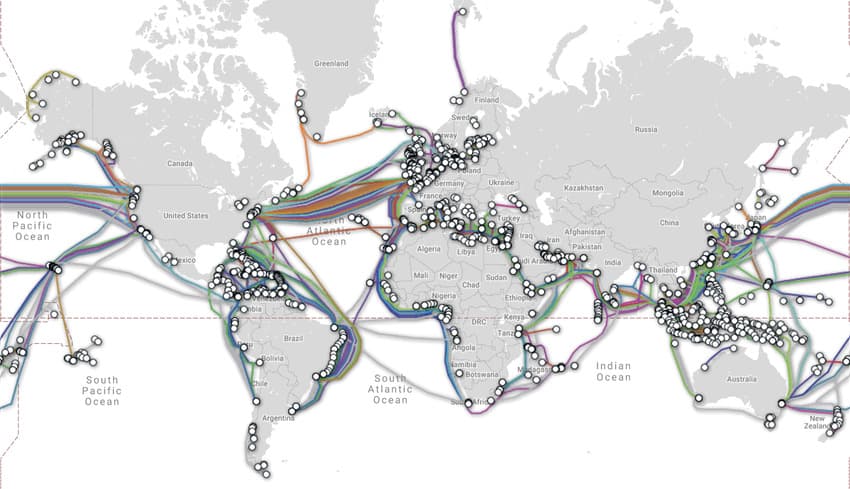
- Slowly, the world was connected using physical wires ( optical fibres ) under the Ocean.
- WWW helped connect related data using hyperlinks and webpages. But searching for something particular was difficult.
- Search Engines and SEO solved that.
Now lets see how the internet (global combuter network of information) reaches us through different Internet Service Providers (ISP):
- Tier 1 ISP ( Global ) : there are less than 20, eg. TATA communication.
- Tier 2 ISP ( Regional ): eg. Jio, Airtel
- Tier 3 ISP ( Local cable and fibre provider )
Data requested by the host computer from another device ( server ) travels through seven layers ( OSI model ). Data enters the host through :
Physical Layer : Data travels as electrical/optical signals in raw bits (0/1)
Data Link Layer : Data converted to Frames - MAC address ( physical address of device) of source and destination added.
Network Layer : Router uses NAT to map shared public IP address to the private IP address of the host. Adds Logical address using Subnet Masking and converts to Data Packets.
Transport Layer : Breaks down data into segments. Uses TCP or UDP protocol depending on type of data. Adds Checksum to ensure data correctness. Establishes a connection between client and server (in case of TCP) using 3-way handshake.
Session Layer : Maintains and manages the established connection and creates the user session by authentication and authorisation.
Presentation Layer : Translates the data packets into format in which application can understand. Data decryption using SSL protocol, data decompression. ( The opposite happens when data leaves the server)
Application Layer : Interface where the user interacts with the data. ISPs also assign private IP address to its devices at this layer using DHCP, which are used by the network layer. eg. whatsapp messenger.
Thats how we get access to the biggest library, living network and central nervous system of the world!
Networking Terminology Hierarchy
A. Physical Layer (Layer 1)
The Physical Layer (Layer 1) of the OSI model is the foundation of networking. It deals with the actual hardware, cabling, and the transmission of raw bitstreams over a physical medium.
I. Signal Types and Modulation
Electrical Signal
- Definition: A voltage or current used to represent data. In copper wiring, high and low voltages correspond to binary 1s and 0s.
- Use: It is the standard method for transmitting data over Ethernet (UTP) and coaxial cables.
Digital Signal
- Definition: A discrete, non-continuous signal that represents data as a sequence of separate values (usually binary).
- Use: Used within computers and over short-distance wired networks because it is less susceptible to noise and easier to process.
Analog Signal
- Definition: A continuous wave that varies in amplitude, frequency, or phase to represent information.
- Use: Primarily used in voice telephony (POTS), radio broadcasts, and traditional cable TV.
Baseband
- Definition: A transmission technique where the entire bandwidth of the medium is used to send a single data signal at a time.
- Use: Standard for Local Area Networks (LANs), such as Ethernet.
Broadband
- Definition: A technique that divides the bandwidth into multiple channels, allowing different signals (voice, data, video) to be sent simultaneously.
- Use: Used for internet delivery via Cable or DSL, allowing you to use the phone and internet at the same time.
II. Transmission Modes
- Simplex
- Definition: One-way communication where data flows in only one direction.
- Use: Examples include FM radio, traditional television broadcasting, or a keyboard sending data to a CPU.
- Full Duplex
- Definition: Simultaneous two-way communication where both parties can send and receive data at the same time.
- Use: Modern Ethernet switches and telephone conversations.
- Half Duplex
- Definition: Two-way communication where data can flow in both directions, but only one at a time.
- Use: Walkie-talkies or older "Hub-based" networks. If two people talk at once, a collision occurs.
III. Media and Cabling
Optical Fiber Cable
- Definition: A cable containing thin strands of glass or plastic that transmit data as pulses of light.
- Use: High-speed, long-distance backbones and "Fiber to the Home" (FTTH) connections due to its immunity to electrical interference.
Coaxial Cable
- Definition: A cable with a central copper conductor surrounded by an insulating layer and a braided metal shield.
- Use: Common in cable TV (CATV) and high-speed cable internet providers.
UTP (Unshielded Twisted Pair) Cable
- Definition: A type of copper cabling with four pairs of wires twisted together to reduce interference, without extra foil shielding.
- Use: The most common cable used in LANs (e.g., Cat5e, Cat6).
Twisted Pair
- Definition: A wiring technique where two conductors of a single circuit are twisted together to cancel out electromagnetic interference (EMI).
- Use: Used in both UTP and STP (Shielded Twisted Pair) for telephone and Ethernet connections.
IV. Transmission Environment
Guided Communication
- Definition: Data transmission through a physical, tangible medium.
- Use: All wired networking (Fiber, Copper, Coax) where the signal is "guided" along a path.
Unguided Communication
- Definition: Wireless transmission of data through the air or vacuum using electromagnetic waves.
- Use: Wi-Fi, Bluetooth, Satellite, and Cellular networks.
V. Networking Hardware
Repeater
- Definition: A device that receives a signal, regenerates it to its original strength, and retransmits it.
- Use: To extend the reach of a network cable beyond its maximum distance limit.
Hub
- Definition: A multiport repeater that broadcasts incoming data to all connected ports, regardless of the destination.
- Use: Largely obsolete; used in legacy networks to connect multiple devices in a star topology.
Modem (Modulator-Demodulator)
- Definition: A device that converts digital signals from a computer into analog signals for transmission over phone/cable lines, and vice-versa.
- Use: Connecting a home or office to an Internet Service Provider (ISP).
VI. Protocols and Units
Bit
- Definition: The smallest unit of data in computing, representing a 0 or a 1.
- Use: The Physical Layer measures performance in "bits per second" (bps).
SDH (Synchronous Digital Hierarchy)
- Definition: An international standard for transmitting large amounts of data over optical fiber using synchronous structures.
- Use: Used by telecommunication carriers to manage high-speed fiber-optic backbones globally.
SONET (Synchronous Optical Network)
- Definition: The North American version of SDH; a protocol for high-speed data transfer over fiber optics.
- Use: Used to provide a standard interface for connecting different fiber-optic transmission systems.
DSL (Digital Subscriber Line)
- Definition: A technology that uses existing copper telephone lines to provide high-speed digital data transmission.
- Use: Providing broadband internet to homes and small businesses without requiring new fiber-optic infrastructure.
B. Data Link Layer (Layer 2)
The Data Link Layer (Layer 2) is responsible for node-to-node data transfer—essentially getting data from one physical device to another on the same local network. It handles error detection and regulates how devices share the physical medium.
I. Addressing and Identification
Media Access Control (MAC)
- Definition: The lower sublayer of the Data Link Layer that provides hardware addressing and channel access control mechanisms.
- Use: It ensures that multiple devices can communicate over a shared medium without interference by managing how they take turns.
MAC Address
- Definition: A unique, 48-bit (6-byte) identifier assigned to a Network Interface Controller (NIC) by the manufacturer.
- Use: It acts as a permanent "name" for a device on a local network, allowing switches to direct data to the correct recipient.
Physical Address
- Definition: Another term for the MAC Address.
- Use: Used to distinguish it from the "Logical Address" (IP Address). It is hardcoded into the hardware and generally does not change.
Frame
- Definition: The Protocol Data Unit (PDU) at Layer 2. It consists of a header (containing MAC addresses), the data payload (from the Network Layer), and a trailer (for error checking).
- Use: It encapsulates packets into a format that can be physically transmitted over the wire or air.
II. Standards and Protocols
Frame Synchronization
- Definition: A technique used to distinguish the start and end of a frame within a continuous stream of bits.
- Use: It ensures the receiver knows exactly where one data packet ends and the next begins, preventing "garbled" data.
Ethernet
- Definition: The most widely used local area network (LAN) technology, defined by the IEEE 802.3 standards.
- Use: It provides the rules for how data is formatted and transmitted over wired connections like UTP or Fiber.
Ethernet Protocol
- Definition: The specific set of rules (like CSMA/CD or Full Duplex) that Ethernet uses to manage communication.
- Use: It governs how devices on a wired network interact to prevent data loss and ensure delivery.
802.11
- Definition: The set of standards governing wireless local area networks (WLAN), commonly known as Wi-Fi.
- Use: It defines how wireless devices communicate at the Data Link and Physical layers using radio waves.
III. Hardware Devices
Bridge
- Definition: A legacy device that connects two different network segments and filters traffic based on MAC addresses.
- Use: Used to reduce traffic by only passing signals meant for the "other side" of the bridge. Modern switches have largely replaced bridges.
Switch
- Definition: An intelligent, multi-port device that learns MAC addresses and forwards data only to the specific port where the destination device is connected.
- Use: The central "brain" of a modern wired LAN, allowing for Full Duplex communication and eliminating collisions.
NIC (Network Interface Card)
- Definition: The hardware component (either an internal expansion card or integrated into the motherboard) that connects a computer to a network.
- Use: It converts the computer's digital data into signals (electrical, light, or radio) suitable for the network medium.
IV. Error Control and Access Methods
CRC (Cyclic Redundancy Check)
- Definition: A mathematical algorithm used to detect errors in the frame trailer.
- Use: The sender calculates a value based on the data; the receiver recalculates it. If they don't match, the frame is discarded as "corrupt."
CSMA/CD (Carrier Sense Multiple Access with Collision Detection)
- Definition: A protocol where a device "listens" to the wire; if it's clear, it sends. If two devices send at once, they detect the collision and wait a random time to retry.
- Use: Used in older, half-duplex Ethernet networks (Hub-based).
CSMA/CA (Carrier Sense Multiple Access with Collision Avoidance)
- Definition: A protocol where a device signals its intent to send before transmitting to avoid collisions entirely.
- Use: Used in Wireless (Wi-Fi) networks, where collision detection is physically difficult.
ALOHA
- Definition: One of the earliest random access protocols (developed in Hawaii) where a station transmits whenever it has data.
- Use: Though rarely used today, it was the foundation for modern protocols like CSMA.
Token Passing
- Definition: A channel access method where a special bit pattern (the "token") is passed from node to node; only the node holding the token can send data.
- Use: Used in Token Ring and FDDI networks to prevent collisions entirely.
V. Specialized Concepts
Frame Relay
- Definition: A standardized Wide Area Network (WAN) technology that transmits data in frames over a shared public network.
- Use: Historically used by businesses to connect remote offices before high-speed VPNs over the internet became common.
DLL (Data Link Layer)
- Definition: The second layer of the OSI model.
- Use: It provides the functional and procedural means to transfer data between network entities.
ARP (Address Resolution Protocol)
- Definition: A protocol used to map a known IP address to a MAC address.
- Use: When a computer wants to send data to an IP, it uses ARP to find out which physical hardware (MAC) actually "owns" that IP on the local network.
Collision
- Definition: An event that occurs when two or more devices attempt to transmit data over the same physical medium simultaneously, causing the signals to interfere.
- Use: Collisions result in data loss and require the devices to retransmit, which can slow down network performance.
C. Network Layer (Layer 3)
Continuing with the Network Layer (Layer 3), this layer focuses on the logical path that data takes across interconnected networks.
I. Addressing and Identification
IP Address
- Definition: A unique numerical identifier assigned to every device on a network using the Internet Protocol.
- Use: It identifies the source and destination of data, allowing packets to be delivered to the correct device globally.
IP Version
- Definition: The specific generation or technical standard of the Internet Protocol being used.
- Use: It determines the format of the address and the routing capabilities of the network.
IPv4
- Definition: Internet Protocol version 4, a 32-bit addressing scheme providing approximately 4.3 billion addresses.
- Use: The most widely used protocol for identifying devices on the internet, written in dotted-decimal format (e.g., 192.168.1.1).
IPv6
- Definition: Internet Protocol version 6, a 128-bit addressing scheme created to replace IPv4.
- Use: Provides a nearly infinite pool of addresses and better security features for the growing number of internet-connected devices.
Private IP
- Definition: An IP address used within a local network that is not routable on the public internet.
- Use: Allows multiple devices in a home or office to communicate internally without using up limited public IP addresses.
Public IP
- Definition: A unique IP address assigned by an ISP that is visible and reachable from the global internet.
- Use: Acts as the "front door" for a home or business network, allowing it to communicate with the rest of the world.
Reserved IP
- Definition: Ranges of IP addresses set aside by IANA for specific technical purposes (e.g., testing or documentation).
- Use: Used to prevent conflicts; for example, 192.0.2.0/24 is reserved for documentation examples.
Local IP
- Definition: The internal address of a device within its immediate local area network (LAN).
- Use: Used by a router to identify which specific laptop or phone inside a house is requesting data.
Global IP
- Definition: Another term for a Public IP address that has global scope.
- Use: Essential for hosting servers or services that need to be accessed from anywhere in the world.
Special IP Address
- Definition: Addresses that have a dedicated function beyond standard host identification.
- Use: Includes broadcast addresses (to reach everyone) or experimental ranges.
Loopback Address
- Definition: A special IP address (127.0.0.1 for IPv4) used to establish an IP connection to the same machine.
- Use: Primarily used for troubleshooting and testing network software on a local machine without a physical network.
Localhost
- Definition: The standard hostname that points to the loopback address of the current device.
- Use: Used by developers to run web servers or databases locally on their own computer.
APIPA
- Definition: Automatic Private IP Addressing; a feature that assigns an IP in the 169.254.x.x range when a DHCP server is unavailable.
- Use: Allows local devices to communicate with each other temporarily even if the router's IP assignment fails.
II. Subnetting and Structure
Subnet
- Definition: A logical subdivision of an IP network.
- Use: Used to improve network performance and security by keeping local traffic within a specific department or area.
Subnetting
- Definition: The mathematical process of dividing a single large network into smaller sub-networks.
- Use: Prevents the waste of IP addresses and reduces "broadcast storms" that slow down networks.
Subnet Masking
- Definition: A 32-bit number that "masks" an IP address to divide it into network and host portions.
- Use: Helps a router determine if a destination IP is on the local network or if it needs to be sent to an external gateway.
Variable Length Subnets (VLSM)
- Definition: A technique that allows subnets of different sizes to exist within the same network space.
- Use: Maximizes IP address efficiency by allowing a small branch office to have a small subnet while a large headquarters gets a large one.
Subnet ID
- Definition: The specific part of an IP address that identifies a particular subnet within a larger network.
- Use: Used by routers to move data between different internal sub-networks.
Host ID
- Definition: The portion of the IP address used to identify a specific device (host) on a network.
- Use: Ensures that once data reaches the correct network, it is delivered to the specific intended computer.
Classes of IP Address
- Definition: The legacy system (Class A, B, C, D, E) that divided IP addresses based on the size of the network.
- Use: Historically used to assign address blocks to organizations; now largely replaced by Classless Inter-Domain Routing (CIDR).
Logical Address
- Definition: A software-based address (IP) that is independent of the physical hardware.
- Use: Allows devices to move between networks and still be reachable, unlike a physical MAC address which is permanent.
Network Address
- Definition: The first address in a subnet, used to identify the network itself.
- Use: Used in routing tables to represent the entire group of devices belonging to that network.
Device Address
- Definition: A general term for the specific address assigned to a network interface (the host part).
- Use: Identifies a unique endpoint in the communication process.
III. Data and Routing
Packets
- Definition: The basic unit of information sent over a network at Layer 3.
- Use: They contain headers with source/destination info and the actual data payload.
Data Packets
- Definition: Packets that carry user-generated data (like an email fragment) rather than network control signals.
- Use: The primary vehicle for transmitting information across the internet.
Datagram
- Definition: A self-contained, independent entity of data carrying enough information to be routed from the source to the destination.
- Use: Typically associated with connectionless protocols where delivery is not guaranteed.
Routing
- Definition: The process of selecting the best path for data to travel across multiple networks.
- Use: Managed by routers to ensure data takes the fastest or most efficient route to its destination.
Static Routing
- Definition: A routing method where paths are manually configured by a network administrator.
- Use: Used in small, stable networks or for specific security paths where the route should never change.
Dynamic Routing
- Definition: A method where routers automatically "talk" to each other to discover the best paths.
- Use: Essential for the internet; if one path goes down, dynamic routing automatically finds a detour.
Routing Table
- Definition: A digital map stored in a router containing the paths to various network destinations.
- Use: The router consults this table for every incoming packet to decide where to send it next.
Forwarding Table
- Definition: A simplified version of the routing table used for the actual high-speed switching of packets.
- Use: Optimized for hardware performance to move packets from an input port to the correct output port instantly.
Router
- Definition: A specialized hardware device that connects two or more networks and directs traffic between them.
- Use: The fundamental building block of the internet, connecting LANs to WANs.
Gateway
- Definition: A node that acts as an entrance to another network.
- Use: Often the router that connects a home network to the Internet Service Provider.
NAT (Network Address Translation)
- Definition: A process that modifies IP address information in packet headers while in transit.
- Use: Allows a whole house full of devices (private IPs) to browse the web using just one public IP.
NAT Server
- Definition: A device (usually a router) that maintains a table of translations between private and public IPs.
- Use: Manages the incoming and outgoing traffic to ensure the right data gets back to the right private device.
IV. Algorithms and Protocols
Dijkstra Algo
- Definition: A mathematical algorithm used to find the shortest path between nodes in a graph.
- Use: Used by protocols like OSPF to calculate the most efficient route through a complex network.
Hop Count Algo
- Definition: An algorithm that measures the distance to a destination by the number of routers (hops) in between.
- Use: Simple method used by older protocols to choose a path based on the fewest "stops."
RIP (Routing Information Protocol)
- Definition: A legacy dynamic routing protocol that uses hop count as its metric.
- Use: Used in small, simple networks to automate pathfinding.
Hop-by-hop
- Definition: A routing principle where each router is only responsible for sending the packet to the next router.
- Use: Simplifies routing because no single router needs to know the entire path from start to finish.
TTL (Time to Live)
- Definition: A value in a packet header that decreases by 1 at every router.
- Use: Prevents packets from circling the internet forever if a routing loop occurs; when TTL hits 0, the packet is deleted.
Identification Number
- Definition: A field in an IP header used to identify packets that belong to the same original message.
- Use: Essential for reassembling packets if they were broken into pieces during transmission.
Fragmentation
- Definition: The process of breaking a large packet into smaller pieces to fit through a network with a smaller "size limit" (MTU).
- Use: Ensures data can travel across different types of networks (e.g., from high-speed fiber to a slower satellite link).
Internetworking
- Definition: The practice of connecting different independent networks to function as a single large network.
- Use: The core concept of the "Internet"—networks of networks working together.
Packetizing
- Definition: The act of taking a stream of data and chopping it into individual packets for transmission.
- Use: Done by the source device so that data can be handled efficiently by network hardware.
ICMP (Internet Control Message Protocol)
- Definition: A supporting protocol used to send error messages and operational information.
- Use: Used by the "Ping" command to check if a server is online.
ICMP Messages
- Definition: The specific packets sent by ICMP (e.g., Echo Request, Destination Unreachable).
- Use: Helps network administrators diagnose why a connection is failing.
V. Transmission Methods
Unicasting
- Definition: Sending data from one sender to one specific receiver.
- Use: Standard for web browsing or sending a private email.
Multicasting
- Definition: Sending data from one sender to a specific group of interested receivers.
- Use: Used for video conferencing or IPTV streams to save bandwidth.
Broadcasting
- Definition: Sending data from one sender to every single device on the network.
- Use: Used by a computer to "shout" for an IP address when it first joins a network.
Anycasting
- Definition: Sending data to the "nearest" or "best" receiver out of a group of potential candidates.
- Use: Used by Content Delivery Networks (CDNs) to make sure you download a video from the server closest to your city.
D. Transport Layer
The Transport Layer (Layer 4) is responsible for the end-to-end delivery of messages between hosts. It ensures that data is delivered reliably, in order, and to the correct application on a device.
I. Protocols and Addressing
- TCP Protocol (Transmission Control Protocol)
- Definition: A connection-oriented, reliable protocol that ensures data arrives intact and in the correct order.
- Use: Used for applications where data accuracy is critical, such as web browsing (HTTP), email (SMTP), and file transfers (FTP).
- UDP Protocol (User Datagram Protocol)
- Definition: A connectionless, "best-effort" protocol that sends data without establishing a connection or verifying receipt.
- Use: Ideal for time-sensitive tasks where speed is more important than perfect accuracy, such as online gaming, video streaming, and VoIP.
- Port Number
- Definition: A 16-bit numerical identifier used to direct traffic to a specific process or service on a computer.
- Use: It allows a computer to distinguish between different types of traffic (e.g., port 80 for web vs. port 25 for email).
- Ports
- Definition: Logical communication endpoints in an operating system.
- Use: They act as "virtual doors" that allow multiple network applications to run simultaneously on a single IP address.
- Ephemeral Ports
- Definition: Temporary, short-lived port numbers assigned automatically by the client's operating system from a predefined range.
- Use: Used by client applications (like your web browser) to communicate with a server; they are closed once the session ends.
II. TCP Connection and Mechanism
- 3-way Handshake
- Definition: A three-step process (SYN, SYN-ACK, ACK) used by TCP to establish a synchronized connection before data is sent.
- Use: Ensures that both the sender and receiver are ready to communicate and have agreed upon sequence numbers.
- Sequence Numbers
- Definition: Numbers assigned to each byte of data sent in a TCP connection.
- Use: Allows the receiving device to reassemble data segments in the correct order, even if they arrive out of sequence.
- Acknowledgement Number
- Definition: A value sent back by the receiver indicating the next byte of data they expect to receive.
- Use: Notifies the sender that the previous data was received successfully, providing reliability.
- Data Segment
- Definition: The unit of data (PDU) handled by the Transport Layer.
- Use: It encapsulates a piece of the application data with a transport header (TCP or UDP) before passing it to the Network Layer.
III. Reliability and Control
- Flow Control
- Definition: A mechanism (often using a "sliding window") that regulates the amount of data a sender can transmit before waiting for an acknowledgment.
- Use: Prevents a fast sender from overwhelming a slow receiver with more data than it can process.
- Congestion Control
- Definition: Techniques used to prevent the entire network from becoming overloaded with traffic.
- Use: When the network becomes "clogged," TCP reduces its transmission rate to help clear the bottleneck.
- Error Control
- Definition: Mechanisms used to detect and correct data corruption or loss.
- Use: Uses checksums to detect corrupted data and retransmission requests for missing segments.
- TPDU (Transport Protocol Data Unit)
- Definition: A formal term for the unit of data exchanged between Transport Layer entities.
- Use: Refers to segments (in TCP) or datagrams (in UDP) as they move through the layer.
- Reset Flags (RST)
- Definition: A bit in the TCP header used to immediately terminate a connection.
- Use: Used when a host receives a packet for a connection that doesn't exist or if there is a serious error.
- Finish Flags (FIN)
- Definition: A bit in the TCP header used to gracefully close a connection.
- Use: Signals that the sender has no more data to transmit and wishes to end the session.
IV. Data Processing
- Segmentation
- Definition: The process of breaking large application data into smaller, manageable pieces (segments).
- Use: Necessary because network paths have a maximum limit on the size of data units they can carry.
- Reassembly
- Definition: The process of putting received segments back together at the destination.
- Use: Uses sequence numbers to ensure the original file or message is perfectly reconstructed.
- Multiplexing
- Definition: Combining data from multiple applications into a single stream of segments to be sent over the network.
- Use: Allows you to browse the web, listen to music, and download a file all at the same time over one connection.
- Demultiplexing
- Definition: The reverse process of multiplexing, where the receiver delivers data to the correct application based on port numbers.
- Use: Ensures that the data intended for your browser doesn't accidentally end up in your email app.
- Timers
- Definition: Internal clocks used by TCP to track events, such as how long to wait for an acknowledgment.
- Use: If a "Retransmission Timer" expires before an ACK is received, the sender assumes the data was lost and sends it again.
E. Session & Presentation Layers (Layers 5 & 6)
The Session Layer manages the "conversation" between devices, while the Presentation Layer ensures data is in a readable format and is securely encrypted.
I. Security and Encryption
- SSL (Secure Sockets Layer)
- Definition: A deprecated encryption protocol used to secure communications over a computer network.
- Use: Historically used to secure websites, though it has been replaced by the more secure TLS.
- TLS (Transport Layer Security)
- Definition: The modern successor to SSL, providing cryptographic security for data moving over a network.
- Use: It is the "S" in HTTPS, ensuring your credit card info or passwords remain private during transmission.
- RSA Algorithm
- Definition: An asymmetric cryptographic algorithm that uses a pair of keys (public and private) for encryption and decryption.
- Use: Widely used to secure sensitive data and digital signatures on the internet.
- Public Key Encryption
- Definition: An encryption method where the sender uses a recipient’s public key to encrypt data, and only the recipient’s private key can decrypt it.
- Use: Allows secure communication between two parties without needing to share a secret password beforehand.
II. Data Representation and Units
- ASCII
- Definition: A character encoding standard for electronic communication, representing text in computers.
- Use: Translates letters and symbols into numbers so computers can store and display text.
- EBCDIC
- Definition: An 8-bit character encoding used mainly on IBM mainframe and IBM midrange computer operating systems.
- Use: Primarily used in legacy enterprise systems rather than modern web applications.
- SPDU (Session Protocol Data Unit)
- Definition: The unit of data used at the Session Layer.
- Use: Organizes the data exchanges and synchronization points between two communicating systems.
- PPDU (Presentation Protocol Data Unit)
- Definition: The unit of data used at the Presentation Layer.
- Use: Carries the information regarding how the data is encoded, compressed, or encrypted.
F. Application Layer (Layer 7)
The Application Layer is the level where users interact with the network through software like browsers and email clients.
I. Web and HTTP
- WWW (World Wide Web)
- Definition: An information system where documents and other web resources are identified by URLs and linked by hyperlinks.
- Use: The global collection of web pages accessible via the internet.
- Browser
- Definition: A software application used to access and view websites (e.g., Chrome, Firefox).
- Use: It interprets HTML/CSS and retrieves data from web servers to display content to the user.
- HTTP (Hypertext Transfer Protocol)
- Definition: The foundation of data communication for the WWW.
- Use: Used to request and transmit web pages between a client (browser) and a server.
- HTTPS
- Definition: The secure version of HTTP, encrypted using TLS/SSL.
- Use: Protects user privacy and data integrity while browsing the web.
- Stateless Protocol
- Definition: A protocol (like HTTP) where each request is treated as an independent transaction with no memory of previous requests.
- Use: Simplifies server design, though "Cookies" are needed to remember things like login status.
- GET
- Definition: An HTTP method used to request data from a specific resource.
- Use: Used when you type a URL or click a link to "get" a web page.
- POST
- Definition: An HTTP method used to send data to a server to create or update a resource.
- Use: Used when you submit a form, like a registration page or a comment.
- PUSH
- Definition: A communication style where the server sends data to the client without the client requesting it first.
- Use: Used for real-time notifications or live updates (like sports scores).
- Status Code
- Definition: A 3-digit number sent by a server in response to a client's request (e.g., 200 OK, 404 Not Found).
- Use: Informs the browser whether the request was successful or if an error occurred.
- Cookies
- Definition: Small pieces of data stored on a user's computer by the web browser.
- Use: Used to track sessions, remember items in a shopping cart, or keep you logged in.
- Third-Party Cookie
- Definition: Cookies set by a domain other than the one the user is currently visiting.
- Use: Primarily used for cross-site tracking and targeted advertising.
- Header
- Definition: The part of an HTTP request/response containing metadata (e.g., browser type, content type).
- Use: Provides necessary context for how the receiver should handle the data.
II. DNS (Domain Name System)
- DNS
- Definition: The system that translates human-friendly domain names (google.com) into IP addresses (142.250.x.x).
- Use: Acts as the "phonebook" of the internet.
- DNS Lookup
- Definition: The process of querying DNS servers to find the IP address associated with a domain name.
- Use: Happens every time you type a website name into your browser.
- DNS Forwarder
- Definition: A DNS server that sends queries it cannot resolve to another, external DNS server.
- Use: Often used in offices to speed up lookups by caching results.
- Root DNS Server
- Definition: The first step in resolving a domain name; it directs the query to the correct Top-Level Domain server.
- Use: The "starting point" of the DNS hierarchy.
- Subdomain
- Definition: A domain that is part of a larger domain (e.g., mail.google.com).
- Use: Used to organize different sections of a website.
- Second-Level Domain
- Definition: The portion of the domain name directly to the left of the TLD (e.g., the google in google.com).
- Use: Represents the specific identity or brand of the website.
- Top-Level Domain (TLD)
- Definition: The last segment of a domain name (e.g., .com, .org, .net).
- Use: Categorizes websites by type or geography.
- ICANN
- Definition: The Internet Corporation for Assigned Names and Numbers.
- Use: The global organization that manages the allocation of IP addresses and domain names.
I. Email and File Transfer
- FTP (File Transfer Protocol)
- Definition: A protocol used for transferring files between a client and a server.
- Use: Used by web developers to upload files to a web server.
- FTPS
- Definition: An extension of FTP that adds support for TLS/SSL encryption.
- Use: Ensures that files and passwords are not sent in plain text.
- Anonymous FTP
- Definition: A way to grant users access to files on an FTP server without requiring a specific user account.
- Use: Often used for public software downloads.
- SMTP (Simple Mail Transfer Protocol)
- Definition: The standard protocol for sending emails.
- Use: Moves your email from your client to the mail server and between servers.
- POP3
- Definition: A protocol used to receive emails by downloading them to a local device.
- Use: Downloads messages and typically deletes them from the server.
- IMAP
- Definition: A protocol for receiving emails that syncs them across multiple devices.
- Use: Allows you to read the same email on your phone and laptop while keeping it stored on the server.
- Delete Mode
- Definition: A setting in POP3 where emails are deleted from the server once downloaded.
- Use: Saves space on the server but prevents viewing the mail on other devices.
- Keep Mode
- Definition: A setting in POP3 where a copy of the email stays on the server after downloading.
- Use: Allows for basic multi-device access, though less efficiently than IMAP.
II. Management and Utilities
- TELNET
- Definition: An old protocol used for remote access to a computer command line.
- Use: Largely abandoned because it is unencrypted; replaced by SSH.
- SSH (Secure Shell)
- Definition: A cryptographic protocol for operating network services securely over an unsecured network.
- Use: Used by admins to log into servers and manage them remotely with encryption.
- SNMP (Simple Network Management Protocol)
- Definition: A protocol for collecting and organizing information about managed devices on IP networks.
- Use: Used by IT staff to monitor the health of routers, switches, and servers.
- NTP (Network Time Protocol)
- Definition: A protocol for synchronizing the clocks of computer systems over a network.
- Use: Ensures all devices on a network have the exact same time, which is critical for security logs.
- RTP (Real-time Transport Protocol)
- Definition: A protocol designed for delivering audio and video over IP networks.
- Use: Used in applications like Zoom, Skype, and Netflix streaming.
- BOOTP (Bootstrap Protocol)
- Definition: An older protocol used to automatically assign IP addresses to devices.
- Use: The precursor to DHCP.
- TFTP (Trivial FTP)
- Definition: A very simple version of FTP with no authentication.
- Use: Used for transferring firmware updates to routers or booting diskless workstations.
- DHCP (Dynamic Host Configuration Protocol)
- Definition: A protocol that automatically assigns IP addresses and other settings to devices.
- Use: When you join a Wi-Fi network, DHCP is what gives you your IP address instantly.
- VNC (Virtual Network Computing)
- Definition: A graphical desktop-sharing system.
- Use: Allows you to remotely control the screen of another computer over a network.
III. Active Directory Concepts (ADS)
- ADS (Active Directory Service)
- Definition: A directory service developed by Microsoft for Windows domain networks.
- Use: Manages users, computers, and permissions in a corporate environment.
- Domain
- Definition: A logical group of network objects (computers, users) that share a common directory database.
- Use: Centralizes management for a specific office or company branch.
- Tree
- Definition: A collection of one or more domains that share a contiguous namespace (e.g., sales.apple.com and uk.apple.com).
- Use: Used to organize domains in a hierarchical structure.
- Forest
- Definition: The highest level of organization in Active Directory, containing one or more trees.
- Use: Represents the entire enterprise network.
- APDU (Application Protocol Data Unit)
- Definition: The unit of data exchanged between applications at the highest layer.
- Use: Represents the actual data (like an email or a web page) before it gets broken down by the lower layers.
G. Architecture & Management
This final section covers the high-level structures that define how networks are built, managed, and troubleshot.
I. Models and Network Types
- TCP/IP Model
- Definition: A four-layer conceptual model (Link, Internet, Transport, Application) used to power the modern internet.
- Use: It is the practical framework used for actual networking implementation across the globe.
- OS Model
- Definition: A seven-layer theoretical model (Physical to Application) that standardizes the functions of a communication system.
- Use: Used as a universal reference for teaching and troubleshooting network interactions.
- LAN (Local Area Network)
- Definition: A network covering a small geographic area, like a home, office, or building.
- Use: High-speed data transfer between local devices (e.g., your home Wi-Fi).
- MAN (Metropolitan Area Network)
- Definition: A network that connects users across a city-wide geographic area.
- Use: Used by cable TV providers or city-wide fiber networks to connect multiple LANs.
- WAN (Wide Area Network)
- Definition: A network that spans large distances, such as countries or continents.
- Use: The internet is the largest example of a WAN.
II. Topologies and Design
- Bus Topology
- Definition: All nodes are connected to a single central cable (the backbone).
- Use: Simple and cheap for very small, legacy networks; if the backbone breaks, the whole network fails.
- Ring Topology
- Definition: Each node connects to exactly two other nodes, forming a continuous loop.
- Use: Used in high-performance fiber networks (FDDI) where data travels in one direction.
- Star Topology
- Definition: All devices connect to a central hub or switch.
- Use: The most common modern topology; if one cable fails, only that device is affected.
- Mesh Topology
- Definition: Every node is connected to every other node (Full Mesh) or most nodes (Partial Mesh).
- Use: Provides maximum redundancy for critical systems like military or backbone internet routing.
- Client-Server Architecture
- Definition: A model where central servers provide resources and "clients" (PCs/Phones) request them.
- Use: The standard for web browsing, email, and corporate databases.
- P2P Architecture (Peer-to-Peer)
- Definition: A model where every computer has equal status and can act as both client and server.
- Use: Used for file sharing (BitTorrent) and blockchain technologies.
- Data Centers
- Definition: Physical facilities that house a large number of networked computers and storage.
- Use: Used by companies like Google or Amazon to host cloud services and websites.
- Control Plane
- Definition: The part of network architecture that determines where traffic is sent (the "brain").
- Use: Handles routing protocols and building the routing table.
- Nodes
- Definition: Any physical device within a network capable of sending, receiving, or forwarding information.
- Use: Computers, routers, and switches are all network nodes.
- Links
- Definition: The physical or logical communication channels that connect nodes.
- Use: Ethernet cables, fiber optics, or wireless radio waves.
III. Security and Reliability
- VPN (Virtual Private Network)
- Definition: An encrypted "tunnel" created over a public network.
- Use: Allows remote workers to securely access a corporate office network as if they were physically there.
- Virtual Network
- Definition: A network where all nodes are connected by software rather than physical hardware.
- Use: Used in cloud computing (AWS/Azure) to isolate different customers' traffic.
- Workgroup
- Definition: A simple peer-to-peer Windows network environment where no central server controls the computers.
- Use: Small home or tiny office networks with fewer than 10-20 computers.
- Proxy Server
- Definition: An intermediary server that sits between a user and the internet.
- Use: Used to hide a user's IP address, bypass filters, or cache web content for speed.
- Firewalls
- Definition: A security system that monitors and controls incoming and outgoing network traffic based on rules.
- Use: Prevents unauthorized access (hackers) from entering a private network.
- Load Balancing
- Definition: Distributing incoming network traffic across a group of backend servers.
- Use: Ensures no single server is overwhelmed, improving website speed and reliability.
- Middlebox
- Definition: A network device that transforms, filters, or controls traffic for purposes other than standard routing.
- Use: Includes firewalls, NAT boxes, and load balancers.
- Redundancy
- Definition: The inclusion of extra components (cables, routers, servers) to ensure the system keeps running if one fails.
- Use: Critical for preventing outages in banks and hospitals.
- RAID (Redundant Array of Independent Disks)
- Definition: A way of storing the same data on multiple hard drives.
- Use: Protects data against a hard drive failure; if one disk dies, the data remains safe on others.
- Network Reliability
- Definition: The probability that a network will perform its required function without failure for a specific time.
- Use: A metric used to evaluate the quality of an ISP or corporate network.
- Downtime
- Definition: The period during which a network or system is unavailable or fail.
- Use: Measured by companies to calculate financial loss during a crash.
- Failure Frequency
- Definition: How often a network component or the entire system fails.
- Use: Used to predict maintenance needs and equipment replacement.
- Catastrophe
- Definition: A major, often physical, event that destroys network infrastructure (e.g., fire, earthquake).
- Use: Addressed in "Disaster Recovery" plans to ensure data is backed up off-site.
- Recovery Time (RTO)
- Definition: The targeted duration of time within which a network must be restored after a failure.
- Use: A key part of service-level agreements (SLAs) between businesses and IT providers.
IV. Fundamentals and Legacy
- Bandwidth
- Definition: The maximum rate of data transfer across a given path.
- Use: Determines how much data (e.g., 100 Mbps) you can download at once.
- ISP (Internet Service Provider)
- Definition: A company that provides access to the internet (e.g., AT&T, Comcast).
- Use: Connects your home/office to the global internet backbone.
- ARPA
- Definition: Advanced Research Projects Agency (now DARPA); a US government agency.
- Use: Funded the research that led to the creation of the internet.
- ARPANET
- Definition: The first wide-area packet-switching network and the direct ancestor of the internet.
- Use: Historically used by researchers to share data between universities.
- Process
- Definition: An instance of a program currently running on a computer.
- Use: A browser "process" communicates with a server "process" at the application layer.
- Thread
- Definition: The smallest unit of execution within a process.
- Use: Allows a single application (like a web server) to handle multiple user requests at once.
- Protocol Syntax
- Definition: The format or structure of the data (the "grammar" of the protocol).
- Use: Defines that the first 8 bits of a packet must be the sender's address.
- Protocol Semantics
- Definition: The meaning of each section of bits (the "logic" of the protocol).
- Use: Defines what a receiver should do if it sees a specific error code.
- Protocol Timing
- Definition: The speed and order in which data is sent.
- Use: Prevents a sender from transmitting data faster than a receiver can listen.
- Sneaknet
- Definition: An informal term for transferring electronic information by physically carrying media (USB, HDDs).
- Use: Used when the data is too massive for the internet or for high-security "air-gapped" systems.
- Address Sharing
- Definition: Technologies (like NAT) that allow multiple devices to use a single public IP.
- Use: Saves public IPv4 addresses and adds a layer of security.
- Horizontal Approach
- Definition: Scaling a network by adding more machines (e.g., adding more small servers).
- Use: Common in cloud environments to handle more traffic.
- Vertical Approach
- Definition: Scaling a network by adding more power to a single machine (e.g., more RAM/CPU).
- Use: Used for upgrading a main database server.
- Distributed Processing
- Definition: Dividing a single task across multiple computers on a network.
- Use: Used in supercomputing and large-scale data analysis.
- Cache
- Definition: A temporary storage area for frequently accessed data.
- Use: Your browser caches website images so they load faster the next time you visit.
- CDS (Content Delivery System)
- Definition: A network of servers that distribute content (often synonymous with CDN).
- Use: Ensures a user in London downloads a file from a London server instead of one in New York.
- Checksum
- Definition: A simple mathematical value derived from a block of digital data to detect errors.
- Use: Used at the Transport layer to check if a packet was corrupted during transit.
H. Tools & Commands
- Ping Command
- Definition: A utility used to test the reachability of a host on an IP network.
- Use: You "ping" google.com to see if your internet connection is working.
- Ping Time (Latency)
- Definition: The time it takes for a ping packet to travel to a destination and back (measured in milliseconds).
- Use: Critical for online gaming; lower ping means less "lag."
- Netstat
- Definition: A command-line tool that displays all active network connections.
- Use: Used to see which apps are talking to the internet and on which ports.
- Ipconfig
- Definition: A command used in Windows to display the current IP configuration of the computer.
- Use: Used to find your own IP address or gateway info.
- Ifconfig
- Definition: The Linux/Unix equivalent of ipconfig.
- Use: Used to configure or view the network interfaces on a Linux machine.